
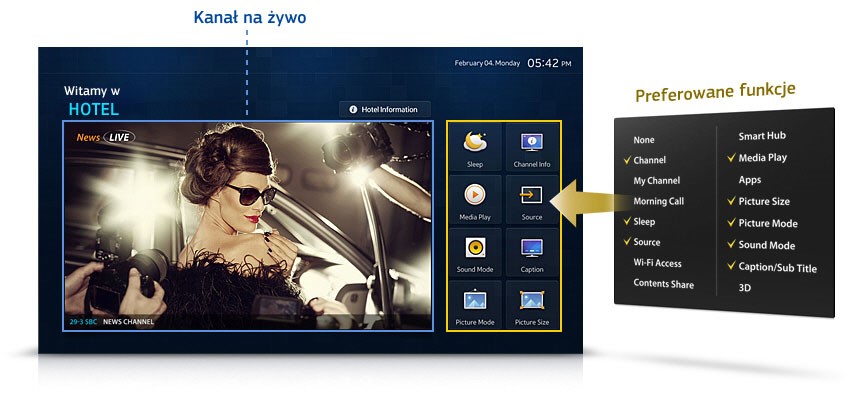
A hotel room TV runs for many hours a day, is used by a different person every few days, and every setting a guest changes means a call to reception. That’s why choosing one is about more than screen size and price. Here is a checklist to take with you when buying – whether you are equipping a new property or replacing TVs in an existing one.
1. Hotel mode and locks
- Menu lock (Hotel Mode) – guests can’t retune channels or change picture settings.
- Maximum and power-on volume – fewer complaints from neighbours, and no blast of sound when the TV is switched on.
- Panel button lock and a screwed battery cover on the remote.
- Power-on channel and source – the TV can start on the hotel’s information channel, for example.
2. Managing many TVs at once
With dozens of rooms, what matters most is how long setup takes – and every later change to the channel list.
- Settings cloning from a master TV via USB stick – the minimum.
- Remote management over the network (e.g. Samsung LYNK, LG Pro:Centric) – update channel lists, firmware and the welcome screen without entering the rooms.
- Integration with the hotel system (PMS) – greeting guests by name and clearing data automatically at check-out.
3. Compatibility with the signal in your building
The TV has to receive the signal that actually reaches the room. Before buying, check whether your installation delivers:
- DVB-T2/HEVC – the current digital terrestrial standard in Poland,
- DVB-C – if a headend distributes channels over a coaxial network,
- IPTV – if TV is to be delivered over the LAN.
Older TVs without DVB-T2/HEVC don’t have to be replaced straight away – often a headend that converts the signal to a standard your current sets support is enough.
4. Features for guests
- Welcome screen and message with the hotel logo.
- Playing content from their own devices – by casting from a phone or through a connection panel (e.g. MediaHub) instead of plugging cables into the TV.
- Clearing data after the stay – if guests can log in to apps on the TV, their logins must disappear automatically.
- Sleep timer, alarm clock, bathroom speaker output – small things guests ask about.
5. Safety and formalities
- Fire-safety certificates required in public buildings.
- Licensed TV channels – channels in a hotel are licensed differently from those at home, so it’s worth sorting this out together with choosing the TVs (see TV channels).
6. Running costs, not just the purchase price
- Energy-saving modes and automatic switch-off after a few hours of inactivity.
- Warranty and service that cover use in hotel mode, not just at home.
- Availability of spare remotes and brackets – these go missing and break most often.
The checklist at a glance
- ☐ Hotel mode with menu lock and volume limit
- ☐ Settings cloning or remote management
- ☐ Reception of the signal in your building (DVB-T2/HEVC, DVB-C or IPTV)
- ☐ Welcome screen and hotel channel
- ☐ Safe playback from guests’ devices and data clearing
- ☐ Fire-safety certificate
- ☐ Energy-saving mode, warranty and service
You’ll find the full list of hotel TV features on our Hotel TV features page. We can also help you choose models that suit your property and its existing installation.